


In development
Price TBA


 Windows · macOS · Linux · Raspberry Pi

Mio
Your telescope’s collimation, read in numbers.
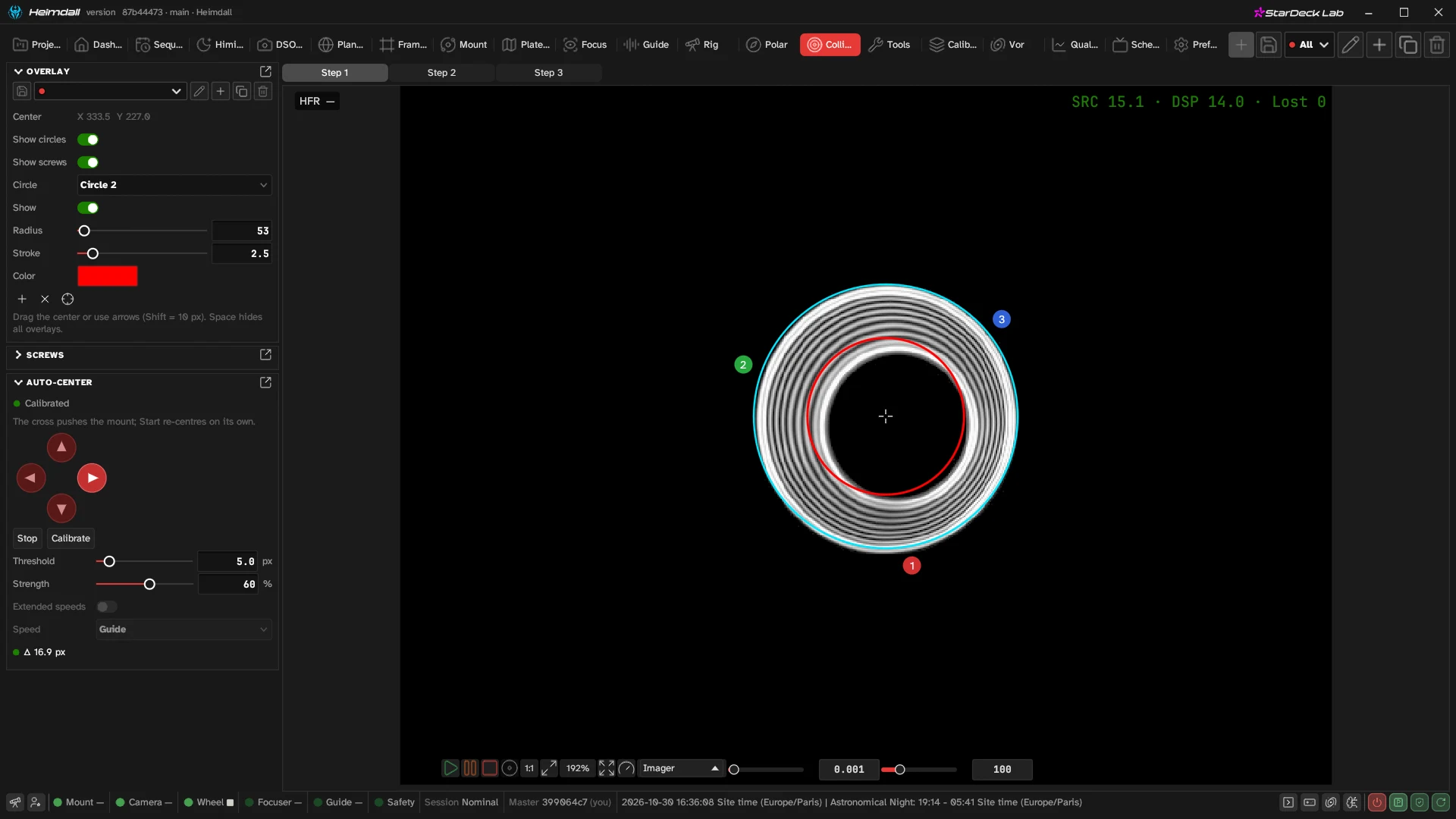
Mio overlays circles and screw positions on a defocused star and tells you how far off-centre your donut is. On the focused star, it compares the measured FWHM with what your optics should deliver. No need to install the whole suite.
Mio is Heimdall’s collimation, sold on its own.
Plug in your camera and mount, launch Mio and collimate. It’s a pre-session tool that does collimation and nothing else.
Who it is for
For anyone who collimates a Newtonian or an SCT by eye on a screen and wants markers and numbers instead, without installing a full imaging suite.
01 · The principle · step 1
A donut, circles, three screws.
Collimating means aligning the optics. Defocus a star: it becomes a donut, which must be concentric. Mio lays circles and the screw positions over the live image: you see the offset, you turn a screw, you see the image again.
- Step 1 · live view
- Step 2 · live + stack
- Step 3 · the stack alone
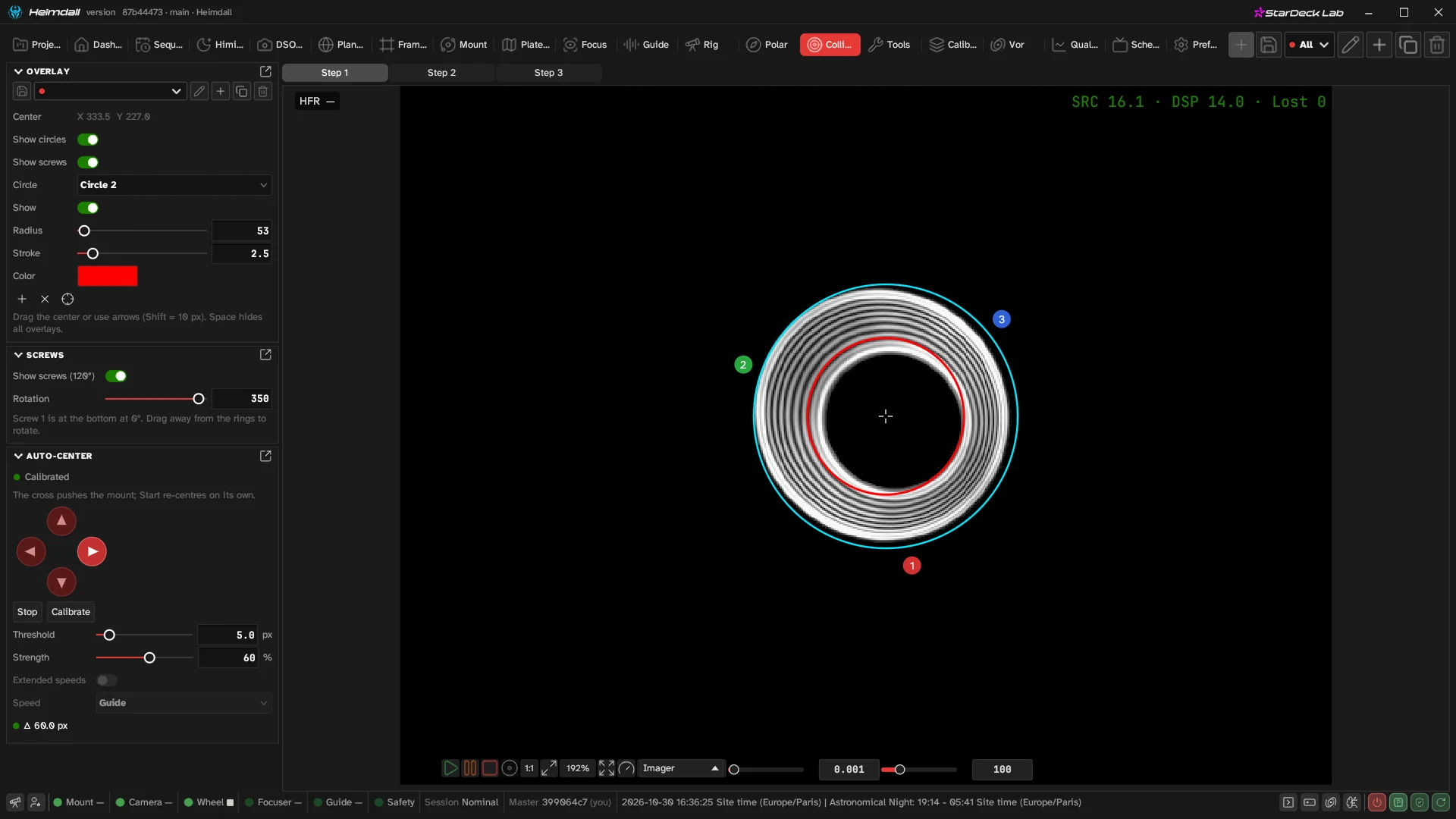
Concentric circles
Position, radius, stroke and colour are adjustable; add some, remove some, re-centre the whole set in one click.
Drag the centre or a ring; arrow keys fine-tune (Shift = 10 px); the space bar hides everything.
The screw markers
Three marks at 120°, with an adjustable rotation to line them up with your telescope.
Your settings, kept
Overlays are stored in a list: create, rename, duplicate, delete.
Live HFR
A number next to the image; a dash when there is no star.
02 · Auto-centring
The star that re-centres itself.
While you turn a screw, the star drifts. Auto-centring brings it back to the centre of the circles with short pulses to the mount.
Start / Stop · Calibrate
Calibrate measures the mount’s response; an indicator shows whether it is calibrated.
Threshold and Strength
How far off before it corrects, and how firmly.
Extended speeds
Guide speed by default, or 2×, 4×, 8×, 16× sidereal, within what your mount accepts.
N / S / E / W cross
Move the mount by hand, in pulses; it lights up during every pulse.
Through the hub
The interface never talks to the mount directly.
03 · Steps 2 and 3
The live view and the stack, side by side.
Frames accumulate into a rolling stack, registered on the star: 5 to 300 frames (25 by default), by average or by maximum. Correct a screw on the left, watch the result build up on the right, on a much cleaner background than the raw image.
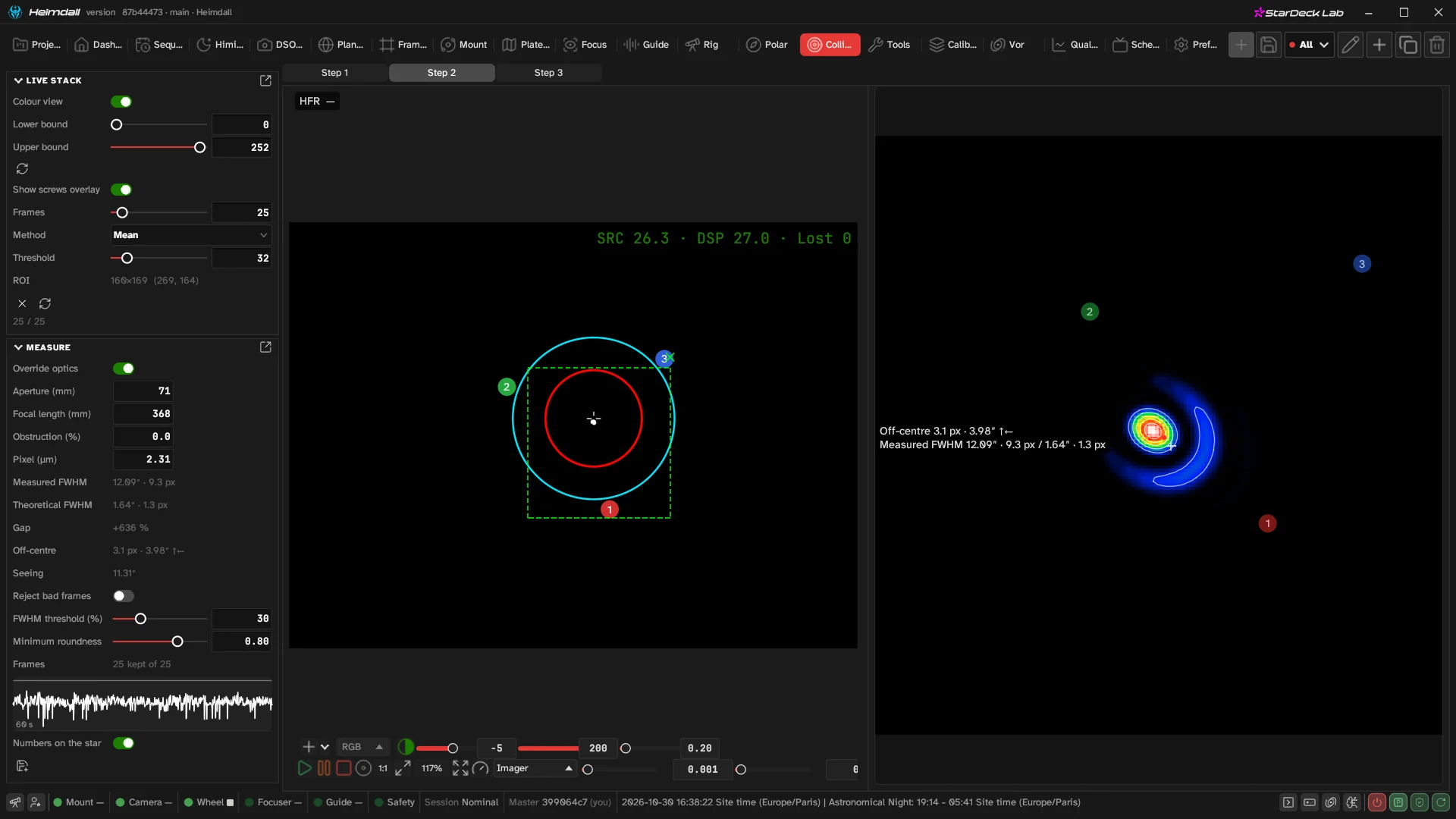
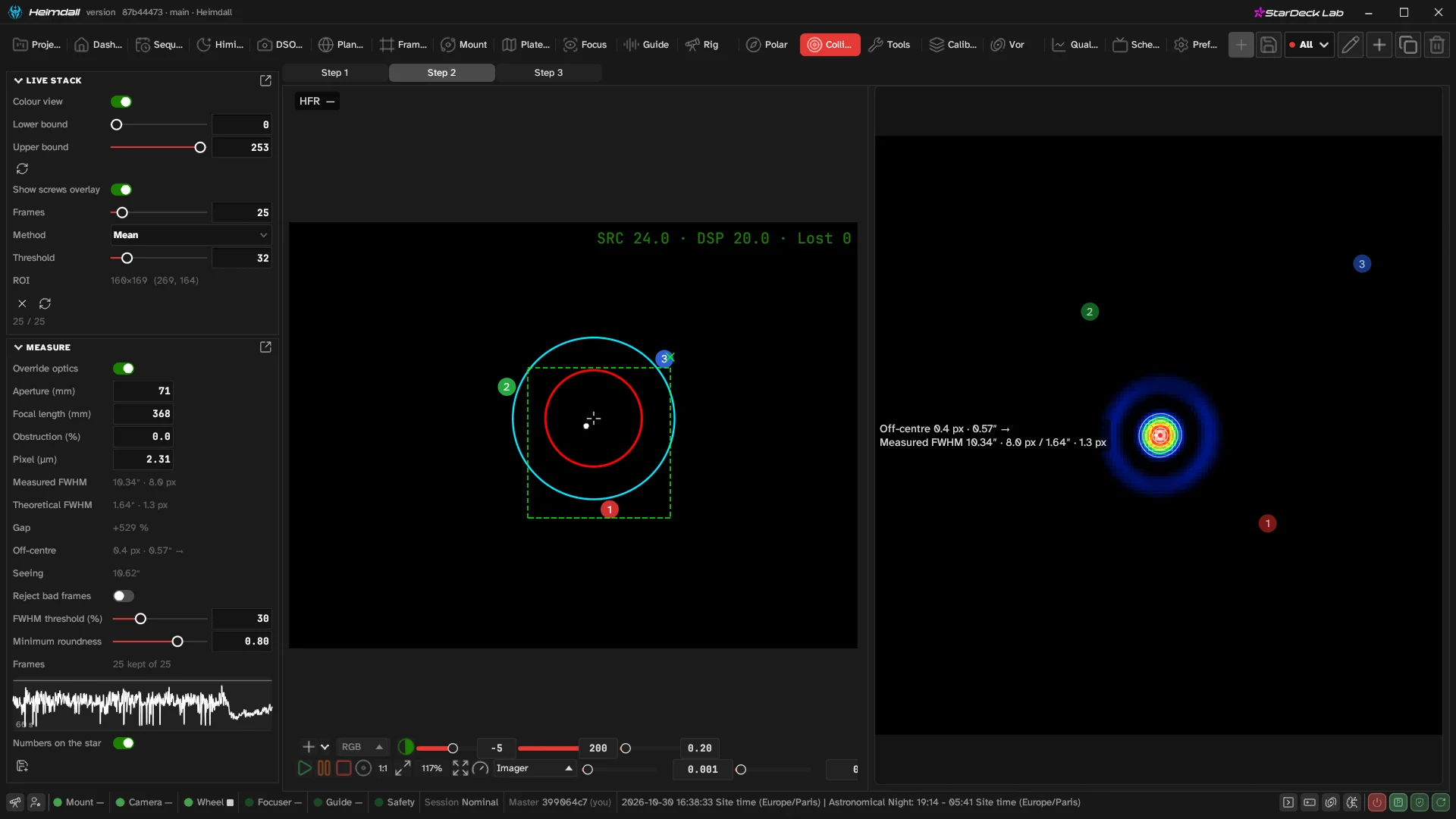
A stacking region
A right-click creates, moves or deletes it; Clear and Reset set the counter back to zero.
The screws, dimmed
They stay visible, read-only, over the stack.
Step 3 · the stack alone
Full size, with zoom, pan and fit to window: the star to look at up close.
04 · Colours and contours
Where the light leaks, at a glance.
A switch turns the stack into a colour view: a palette from the black background to the white core, and five contours at equal intervals. The donut’s symmetry and the side where light leaks show straight away.
A cross and a red dot
The cross marks the geometric centre of the contour, the red dot the centre of the light. Collimating means bringing the dot back onto the cross.
Their offset is never magnified: they sit at their true position.
Adjustable bounds
A low and a high bound, computed automatically at every frame, that you can set by hand; Reset returns to automatic.
View off, nothing changes
The display never touches the stack’s data.
05 · Measure
Collimation, in figures.
A Measure panel, in steps 2 and 3, puts figures on the collimation of the focused star.
Measured / theoretical FWHM
Mio measures the stacked star and computes your optics’ theoretical FWHM (aperture, focal length, obstruction, pixel size, at 550 nm). The gap is given as a percentage.
Off-centre offset
The gap between the cross and the red dot, in pixels and arcseconds, with its direction.
Seeing
Each frame’s FWHM over 60 seconds, as a curve, and the current seeing in arcseconds.
Bad-frame rejection
Drops swollen or trailed frames (FWHM threshold 30%, roundness 0.80 by default). A counter reads “n kept out of N”.
Numbers on the star
Offset and FWHM ratio next to the star, outside the Airy disc, visible whatever the zoom.
Annotated export
A PNG of the stack with an arcsecond scale bar and a banner: FWHM, offset, frames kept, seeing, optics, date and time.
What sets Mio apart
Markers and numbers
Collimation judged by eye stays an impression. Mio gives you markers (circles, screws, crosshair, coma point) and numbers: HFR, off-centring, measured versus theoretical FWHM.
Collimation only
General capture software shows a video stream. Here, the star re-centres while you turn the screw, stacking makes it readable, and the measured FWHM is compared with your scope’s theoretical value.
Measured over many frames, not one
A single frame misleads, because of turbulence. Mio stacks, drops the bad frames and shows you the seeing.
Standalone app
- A single window, nothing else
- Camera and mount through the hub
- In French and English
What Mio is not
- Deep-sky capture
- Night sequences
- Long-exposure guiding
- Tilt and backfocus
It is an adjustment tool, not a station. Tilt and backfocus are measured in Vör.



Beta
Collimate your tube with Mio.
Mio is in development. Join the beta: we select testers with a variety of tubes and setups.
Selected beta testers get Mio free for life.
A few emails at key milestones. No newsletter.