
Project — integration, night and weather

Project — integration, night and weather

Workshop · 02 / 17

Project

one target, many nights, all in one place

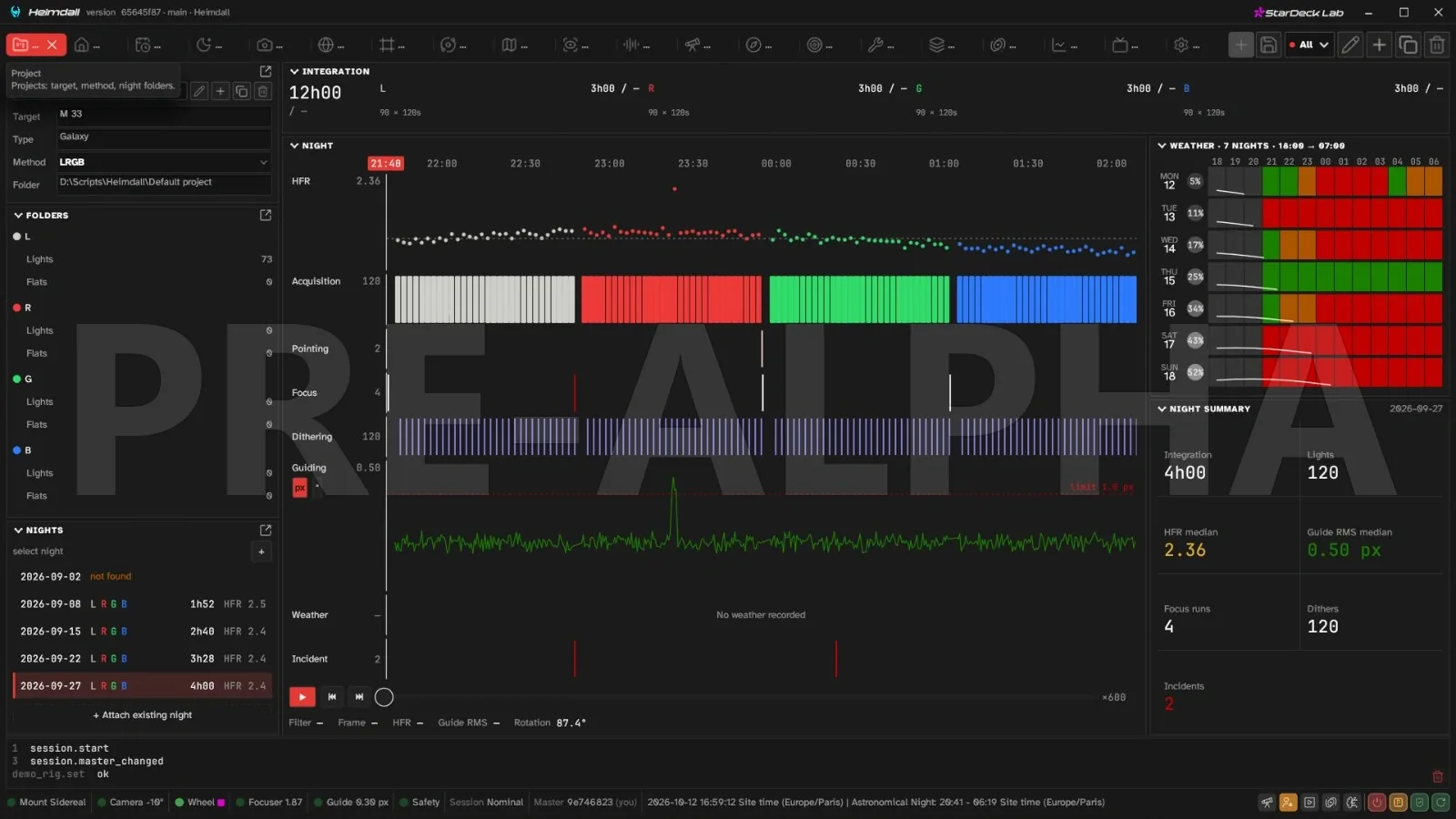
Integration per filter against your goal, past nights you can replay, weather for the next seven nights: the Project follows your target from the first frame to the final image.

The Project is Heimdall's organization workshop. One target, one method, nights that stack on top of each other: it keeps track when an image takes weeks to build.

In short

One target, all its nights.

Nights are added, attached (even last year's) and counted together: the final image has a readable history.
Know what's left to do.

One tile per filter, a goal in hours, a bar that fills: you see at a glance where you stand in L, Ha, OIII.

Nothing moved, nothing hacked together.

The Project / night / filter layout is Siril-compatible, files never overwrite each other, copies leave the originals intact.

Understand what happened on Tuesday.

The time axis replays a night with its focus runs, dithers, guiding losses and HFR curve.

Pick the right night.

Seven nights, hour by hour, with a score built for imagers and the Moon on the same band; your weights, your rules.

What the workshop does

A deep-sky image isn't made in one night. You shoot M33 tonight, come back in three days, then again next month. The Project answers the questions you ask between nights: how many hours do I have so far, filter by filter? What happened on Tuesday? When is the next good night?

A Project is a target, an acquisition method (LRGB, SHO…) and the folder that receives all the nights. Everything it shows is read from your disk and from the night journals: nothing is moved, nothing is made up.

What sets it apart

A file manager files things. The Project knows which target, which method and which night it is dealing with, and counts hours per filter against a goal.

A session log is read afterwards, by hand. Here the night replays: a time axis, a cursor, a summary.

A weather app gives cloud cover. The Project turns it into a verdict for every hour of true night, with the Moon, and lets you tune the weights.

All features · 38

Create and manage your Projects

  • Creates a Project from a targetYou look up the object with Himinn's search engine; its names, type, constellation, size and coordinates are saved in the Project.
  • Pre-fills the nameThe Project takes the target's name, editable right away. It becomes the folder name.
  • Sets the acquisition methodEight methods to choose from: DSLR, OSC, RGB, LRGB, LRGB+Ha, SHO, HOO, LRGB+SHO. The method decides which filters are tracked.
  • Sets the target as the current objectChoosing a Project makes its target the shared current object across Heimdall, without triggering anything: the mount is never slewed.
  • Renames, deletes, duplicatesRename by clicking the name that is already selected. List actions are saved immediately.
  • Duplicates in two modesStructure only (sheet and empty folders), or structure with the files already shot, copied in the background with a progress bar. Originals are never touched; a failed copy is cleaned up.
  • Keeps a default ProjectAlways there, it receives exposures taken outside a Session. It also accepts a target: its photos are then filed in a subfolder named after it.

Clean filing, Siril-compatible

  • Files every exposure in the same placeProject, then night date, then filter, then the raw, lights, darks, flats, biases folders: the structure Siril expects, created at the first photo of the filter.
  • Names files without collisionsObject, filter, duration, UTC date and time, counter: an existing file is never overwritten.
  • Writes the Project into every photoThe PROJECT FITS card and the night journal carry the Project's name, so the workshop finds its nights on its own.
  • Counts your photos per filterLights and Flats for each filter of the method, nights added up; a filter with no photo stays visible at zero.
  • Never moves anythingThe per-filter view reads the disk; it doesn't reorganize it.

The Project's nights

  • Lists the nightsOne row per night: date, filters as colored chips, total exposure time and median HFR. The latest night is selected when you open the tab.
  • Adds tonightOne click on "+" creates the dated folder and a night.json descriptor; the night date rolls over at noon. If the night already exists, it is simply selected.
  • Attaches an existing nightA night folder in Heimdall's format, last year's for instance: as a link (Heimdall remembers the path and reads in place) or as a copy into the Project folder. A copy replaces no file and leaves the originals untouched.
  • Refuses what isn't a nightA folder with neither a descriptor nor Heimdall's layout is rejected with a message.
  • Keeps a missing night in the listFolder moved or drive unplugged: the night stays, flagged as missing, and doesn't count toward the totals.
  • Reads older nightsNights filed before the workshop existed are listed, and nothing is written into them.

Integration against the goal

  • Shows one tile per filterTime taken, goal, progress bar and number of frames × duration.
  • Adds up across all nightsNights in the folder, linked nights and the default Project's target subfolders all count together.
  • Sets a filter's goal in two gesturesDouble-click the tile, type "8h" or "8h30", press Enter to confirm; clicking elsewhere cancels. The goal is saved with the Project.
  • Displays the totalTime taken against the goal for the whole Project.

Replay a night

  • Draws the night on a time axisStacked tracks: each frame's HFR, acquisition (bars colored by filter), plate-solve pointings, focus runs (a failure in red), dithers and incidents.
  • Plots guidingRMS guiding curve with its limit line, in pixels or arcseconds as you prefer.
  • Replays the night▶ runs it sped up (×600) with a cursor that moves on its own; pause at any time.
  • Steps frame by framePrevious / next buttons, and a cursor you can drag.
  • Reads the state under the cursorFilter, frame number, duration, HFR, guiding RMS, angle of the latest plate-solve; "—" when a value wasn't logged.
  • Summarizes the nightIntegration, lights, median HFR, median guiding RMS, focus runs, dithers, incidents (in red when there are any).
  • Stays honest without a journalA night with no journal shows a message, greys out the playback controls and gives only integration and light count.

The next seven nights' weather

  • Shows seven nights at a glanceOne row per night, the current or next night on top, one cell per hour from evening to early morning.
  • Scores every hourA 0–100 score built from cloud cover (total and high), humidity, wind, gusts, visibility, rain and a risen Moon: green from 70, orange from 45 to 69, red below.
  • Greys out hours that aren't dark enoughWhile the Sun is less than 18° below the horizon, the cell stays grey with no score: only true night hours carry a verdict.
  • Shows the MoonA phase chip with its illumination at midnight, and a curve of its altitude across the hourly band.
  • Computes the sky locallySun, twilights, Moon phase and altitude are computed on your machine, for your observing site.
  • Lets you tune the weightsPreferences → Weather: one field per weight and threshold, with "restore defaults".
  • Updates when you open itOn opening the tab, if the last forecast is more than an hour old. With no network, the last forecast stays on screen with its age; the rest of the workshop works offline.
  • Says so when it doesn't knowObserving site not set, or no forecast ever retrieved: a clear message, not an invented grid.

Comfort

  • Speaks French and English

All Heimdall workshops