
Live azimuth and altitude errors

Live azimuth and altitude errors

Workshop · 13 / 17

Polar alignment

the star triangle and plate-solving

Three stars, a local plate-solve, and a live reading of your mount's error: you know which way to turn the knobs, and by how much.

Polar Alignment is the polar-setup workshop. It measures where your mount's right-ascension axis points relative to the celestial pole, and reports it in arcminutes, in azimuth and in altitude.

In short

A clear direction for every knob.

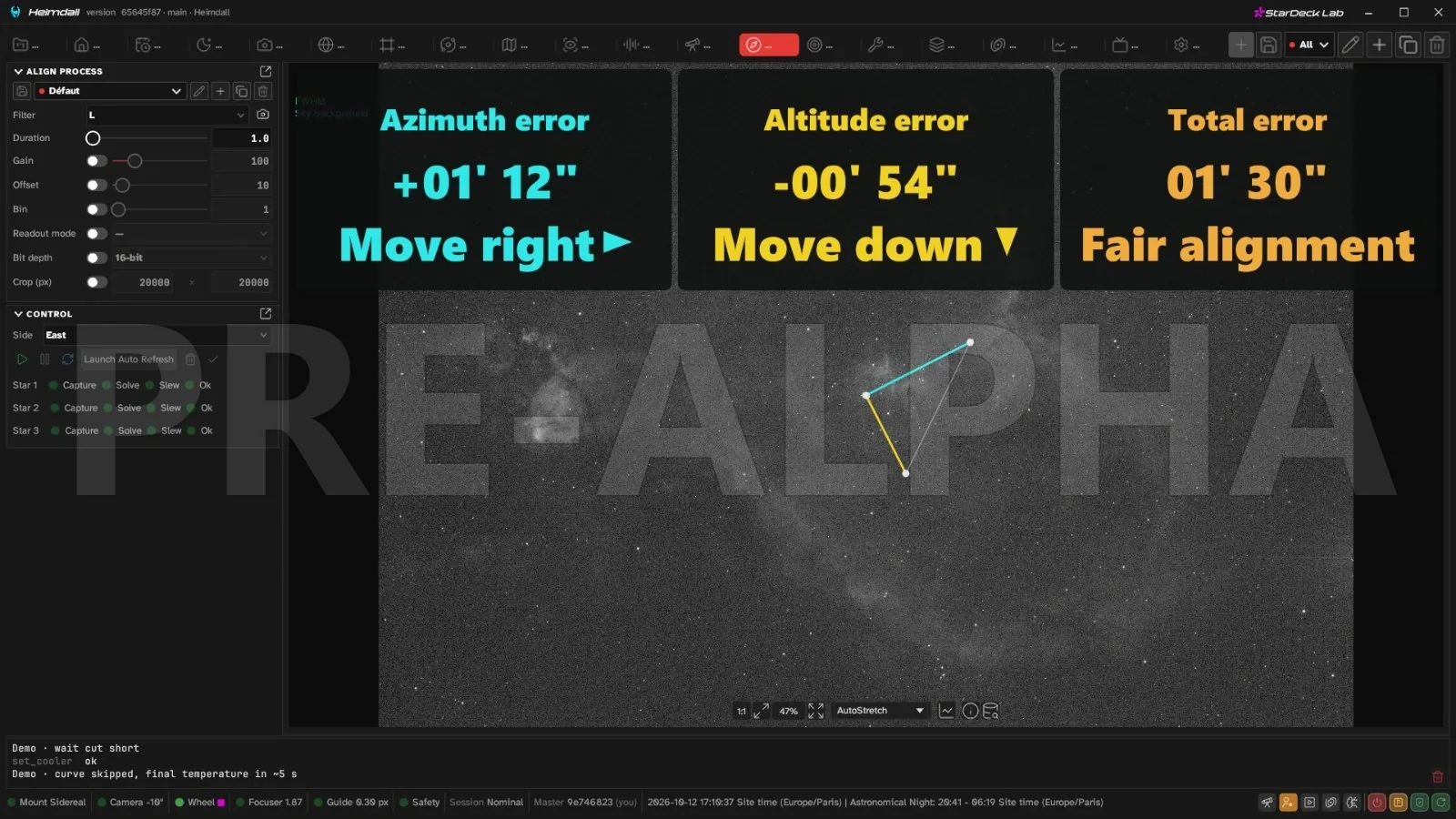
Triangle, arcminutes in azimuth and altitude, arrows: you know what to turn and which way.
A short loop, not a long drift.

Three stars, one measurement, one correction, again: you watch the error fall as you turn.

No network, no other software.

The anchor plate-solve is local, with a built-in catalog for both hemispheres.

A threshold that suits you.

Green, orange, red according to the threshold you set: you aim for the result that suits your focal length.

A result you can freeze.

Validate keeps the last error for the session.

What the workshop does

On an equatorial mount, the right-ascension axis must aim at the Earth's rotation axis. In the field you can't see it: you infer it. The workshop replaces a long drift procedure with a short loop: capture, solve, correct, repeat.

Three successive stars are enough to locate the axis. The workshop draws the error as a triangle over the camera image and adds arrows: East, West, up, down. You turn the knobs, the measurement refreshes, the error drops. All of it works offline.

What sets it apart

A drift-based polar alignment needs long measurements. Here, three stars and a plate-solve are enough, and the measurement repeats live.

An assistant that depends on an external solver requires installing it. This one solves locally with its own reduced catalog.

An assistant that moves without checking exposes your gear. This one checks safety, refuses a parked mount and keeps abort at hand.

All features · 22

Measure

  • Measures on three starsFor each star: a short exposure, an anchor plate-solve, a one-hour slew in right ascension, then the next star.
  • Chooses the rotation directionEast or West: the direction decides how the mount moves between two stars.
  • Sets the measurement exposureDuration, gain, offset and binning, with ready-to-use starting values.
  • Solves locally, with no networkThe anchor plate-solve uses a reduced catalog built in for both hemispheres; it works without any other solving program.
  • Tracks progress with indicatorsCapture, Solve, Slew, Ok light up in cascade for each star; after the third, "Anchored — turn the knobs".
  • Works with the guide camera or the main cameraWhichever the hub exposes.

Read the error

  • Draws the star triangleThe picture of the error between the mount axis and the true polar axis, over the camera image.
  • Puts numbers on the errorAzimuth error, altitude error and total error, in arcminutes.
  • Shows which way to correctEast / West / up / down arrows say which way to turn the azimuth and altitude knobs.
  • Moves the anchor point with the mouseClicking a star in the viewer locks onto it and the computation recenters around it.
  • Colors by an adjustable thresholdGreen below half the threshold, orange up to the threshold, red beyond; the threshold is in arcminutes and is kept from one session to the next.

Correct in a loop

  • Refreshes liveWhile you turn the knobs, a new measurement restarts from the first star and posts a new result; you watch the error drop.
  • Starts and stops Auto RefreshOne button chains the measurements, another stops them cleanly.
  • Pauses and resumesPause keeps the current star, the indicators and the last error; resume restarts from the kept star.
  • Validates the session's errorValidate freezes the last measurement (azimuth, altitude, total), recalled afterwards without recomputing.
  • Resets everythingThe trash can returns the workshop to its pre-launch state: no validated error, no kept image.

Safety and state

  • Refuses to move a parked mountThe "mount parked" state is displayed, and safety comes before any movement.
  • Keeps abort within reachThe status bar with abort and park stays visible.
  • Displays the session stateReady, anchoring, paused, anchored, live refresh, error validated.
  • Reports failures with stable codesSession already running, solve failed on the last star, validation without a measurement: the same codes in either language.
  • Asks for what it needsWithout a camera or a controlled mount, the session won't start; without a known latitude, the workshop says so.

Comfort

  • Speaks French and English

All Heimdall workshops