Collimation: circles, screws and HFR

Collimation: circles, screws and HFR

Workshop · 14 / 17

Mio

collimation built into Heimdall

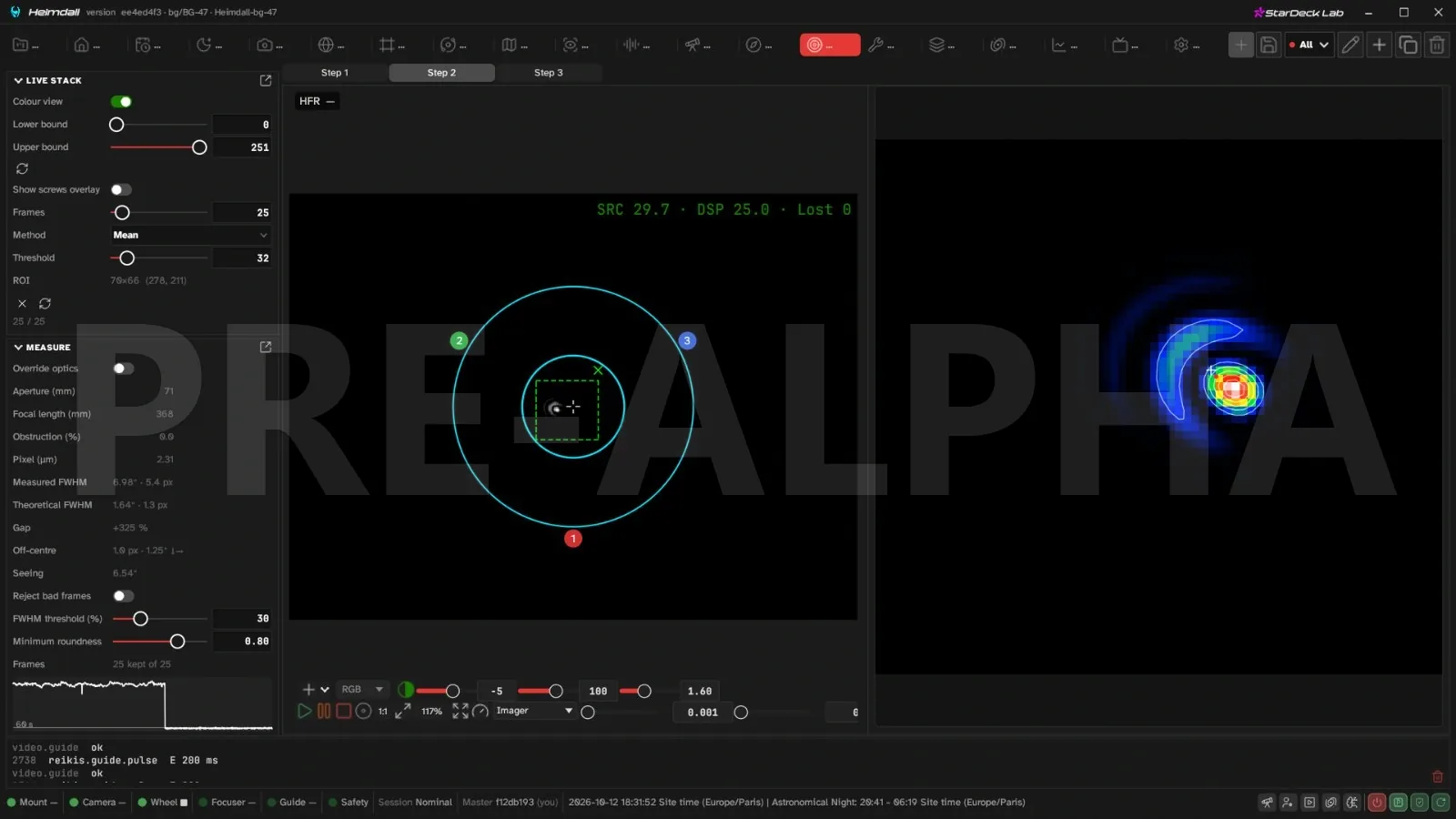
Donut figure, circles, screws and live HFR on the video feed: set your telescope's collimation without leaving your station.

Mio is Heimdall's collimation workshop. You use it before the night, on a star, with the camera connected.

In short

See how far off-center you are.

Concentric circles, marked screws, numeric HFR: adjusting stops being guesswork.
The star recenters itself.

The auto-centerer brings the star back to the circles' center: you keep the same reference while you adjust.

A result that reads better.

The rolling stack brings out a clean donut against a noisy background.

All inside the station.

The camera and the mount are the Rig's; you go from collimation to imaging without reconnecting.

What the workshop does

Collimating means aligning the optics. You defocus a star: it becomes a donut, and that donut must be concentric. The workshop overlays circles and the position of the adjustment screws on the live image: you see how far off-center the donut is, you turn a screw, you see the image again.

Inside Heimdall, the camera and the mount are those of your Rig, through the hub: nothing to reconnect.

What sets it apart

Collimating by eye on a screen is judged by impression. Here, circles, screws and HFR give measurable references.

An external tool means sharing the camera and the mount between two programs. Here, the workshop works on the same hub as everything else.

All features · 20

See the donut

  • Shows the live video feedThe hub's camera, with the exposure and gain bar.
  • Lays down concentric circlesPosition, radius, stroke width and color are adjustable; you add some, remove some, recenter the set in one click.
  • Moves the circles with the mouseDrag the center or a ring; the arrow keys fine-tune (Shift = 10 pixels); the space bar hides everything.
  • Marks the screw positionsThree markers at 120°, with an adjustable rotation to line them up with your telescope.
  • Keeps several setupsOverlays are stored in a list (create, rename, duplicate, delete) saved on the computer.
  • Displays live HFRA number next to the image; a dash when there is no star.

Center the star automatically

  • Recenters the star on the circles' centerThe auto-centerer sends short pulses to the mount.
  • Calibrates itselfA button measures the mount's response in the four directions; an indicator shows the state.
  • Is adjustableAggressiveness, maximum pulse duration, dead zone in pixels.
  • Can be driven by handA North / South / East / West pad moves the mount in pulses.
  • Goes through the hubPulses use the hub's guiding control; the interface never talks to the mount directly.

Stack for a clearer view

  • Accumulates frames continuouslyA rolling stack of 5 to 300 frames (25 by default), registered on the star.
  • Chooses the methodMean or maximum, with a threshold from 0 to 255.
  • Delimits a stacking zoneA right-click creates, moves or removes the zone; Clear and Reset zero the counter.
  • Overlays the screws, dimmedOn the stack, the screw markers stay visible, read-only.

Three steps

  • Step 1: liveVideo feed with circles, screws and the auto-centerer.
  • Step 2: live and stack side by sideYou adjust the screw and watch the result build up.
  • Step 3: the stack alone, large, with zoom, pan and fit-to-window.

Comfort

  • Stays safeThe station's abort and park remain within reach; a watcher cannot change the settings.
  • Speaks French and English

All Heimdall workshops